
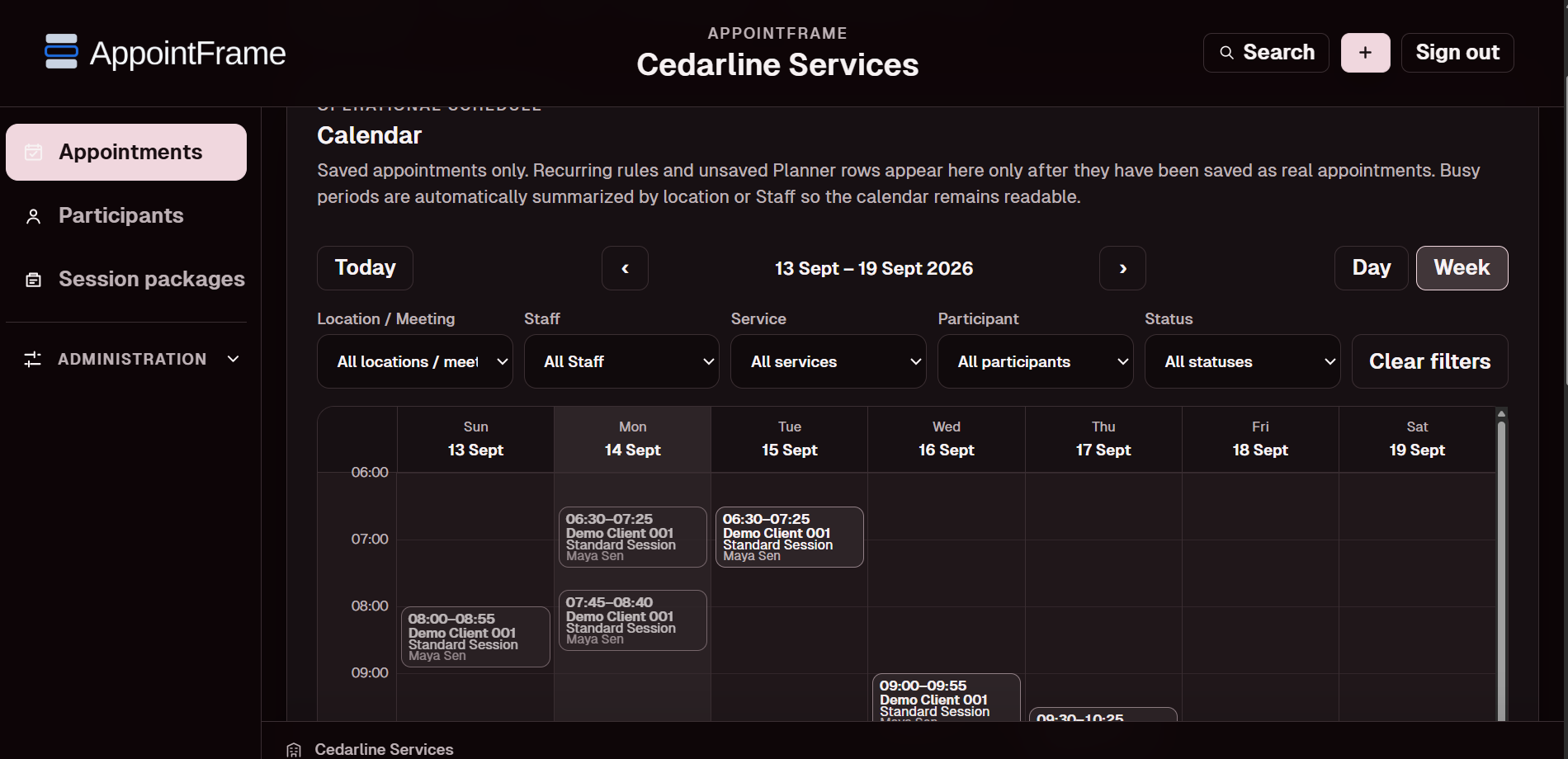
Calendar shows saved appointments only. Day and Week views remain filterable by Location / Meeting, Staff, Service, Participant and status, with busy scopes summarized automatically.
For recurring-session businesses
Schedule faster.
Repeat less. Stay in control.
AppointFrame combines administrator-controlled scheduling with secure client self-service: Calendar, flexible exact times, Planner, recurring schedules, Session Packages, Group Sessions and operational availability in one system.
Run saved appointments from Calendar, prepare batches and recurring-generated drafts in Planner, and create a new appointment from the global + action from anywhere in the administrator application.
Planner remains the construction workspace for adding rows, copying a week or month, reviewing recurring-generated drafts and committing prepared appointments.
The global + action opens Add appointment from any administrator workspace while the same Package, Staff, Location / Meeting, capacity and conflict validation continues to apply.
Scheduling workflows
Book exact dates now. Define repeating patterns separately.
AppointFrame deliberately separates explicit bookings from recurrence. If you know the exact dates, create them now. If you know the rule, save the rule and let future matching occurrences follow it from the chosen start date.
01
Explicit appointments
One context. One date or many arbitrary dates.
Choose Participant, Service, Location / Meeting and Staff once. Use suggested available times for speed or enter an exact start time when the real schedule requires it, then continue across one date or many arbitrary dates.
- Suggested times are conveniences, not artificial booking restrictions.
- Suggested and exact manual times use the same availability, buffer, Package, Staff, Location / Meeting and conflict validation.
- Successful appointments enter the database immediately and follow the normal confirmation, Staff assignment and reminder lifecycle.
Flexible start times. One validation engine. If a booking cannot be made, AppointFrame returns the specific scheduling reason instead of treating every failure as generic unavailability.

02
Recurring schedules
Save the repeating rule — not a pile of future appointments.
A recurring schedule is independent from an appointment. Choose its start date, frequency, weekday/time patterns and ending condition, then preview what the rule means before saving it.
- Weekly, every-N-weeks and monthly patterns stay separate from explicit bookings.
- The preview is informational: saving the rule does not create appointments today.
- Pause, edit only the future rule, or end the schedule without rewriting historical appointments.


Manage the rule
Recurring schedules remain first-class objects.
See the schedule type, cadence, linked context, start and ending condition in one place. Pause an active rule, edit future behavior, or end it without turning past appointments into something else.
Copy previous week and Copy previous month still handle broad calendar replication. Recurring schedules are for patterns that genuinely repeat.
Group scheduling
The same explicit-versus-recurring distinction applies to Group Sessions.
Create one or several explicit Group Session shells immediately from the same Service, Location / Meeting and Staff context. Use suggested times or enter an exact start time when needed; both follow the same availability and buffer rules. Participants remain optional. A genuine repeating Group pattern belongs in Recurring schedules instead.
One or many explicit Group SessionsParticipants optional at creationParticipant Package eligibility revalidated for each session

Scheduling context
One appointment keeps the rules that make it valid.
Calendar and Planner are two views of the same appointment engine. Every saved appointment stays tied to the Package, Staff and Location / Meeting context that made it bookable, while blocked actions return the rule that prevented them.
A Session Package is tied to one currency and can cover exact Service + Location Offerings. Completed work, remaining sessions and financial history stay coherent.
Operating hours, Service availability, Staff availability, pre/post appointment buffers, daily capacity, per-Service limits, conflicts and explicit overrides remain part of the booking decision.
Physical Location Offerings use the Location timezone. Online Offerings use the Organization operating clock. Clients and Staff can see the same appointment in their configured timezones.
Where configured, physical Resources belong to Locations and can be associated with Service Offerings and appointments. Their availability and eligibility form part of scheduling.

Client-initiated, administrator-approved
Let clients request packages. Keep approval with your team.
Verified clients can request a Session Package without administrator data entry. The request stays pending until the business reviews the participants, payment arrangement and policies. A request is not a bookable package.
Choose from the public Service Offerings.
Clients select active, publicly available Service + Location Offerings. Fixed packages allocate a number of sessions across chosen offerings; open-ended requests follow a different charging basis.
One payer can request for linked clients.
Administrators choose whether each client can request only for themselves or for themselves and explicitly associated clients. The payer may be the contact without attending sessions.
Show the estimate and policy summary.
The client sees an estimated fixed-package total where applicable and the current policy summary. Payment and policy administration are not exposed through the client form.
Review before the first booking.
The administrator verifies membership, confirms the external payment arrangement and package policies, then approves or rejects the request. Only an approved, eligible package can support bookings.
No online checkout. AppointFrame records external payment details, payment progress and amounts due; the business collects money through its own arrangements. The client can review and withdraw pending requests, but cannot approve or activate them.
Communication & notes
Schedule once. Let the operational follow-up come from the same record.
Confirmations, reminders, cancellations, Staff updates, Payment Statements and Session Notes prompts are generated from the appointment or package lifecycle rather than maintained as a second disconnected workflow.
Email + WhatsAppRecipient-local date/time with the actual session Location / Meeting, with client communication history available for later review.
Session NotesOne consolidated reminder opens the sessions that still need notes, without forcing Staff to work through them in order.
Payment StatementsThe reviewed PDF snapshot can be delivered through the supported communication channels from the package itself.


Calendar integrations
Bring Google Calendar or Outlook appointments into AppointFrame.
Connect an existing calendar, review its events, map them to AppointFrame and import only the appointments that pass the normal scheduling rules.
Can doConnect Google Calendar or Outlook / Microsoft 365, review events, map Participant / Service / Location / Staff context, validate and import.
Will not doConnecting a calendar does not automatically create, reschedule or cancel AppointFrame appointments. AppointFrame remains the operational system of record.

Controlled access
Give clients and Staff the tools they need — without administrator access.
Clients can book eligible appointments and initiate package requests. Instructors can review their own teaching work. Organization configuration, client associations, package approval and access assignment remain controlled by authorized staff.
Secure client access
Book appointments. Request packages for approved participants.
Secure access verifies an existing, active client before eligible booking and participation actions are shown. Clients can submit Session Package requests for themselves or administrator-associated clients, review request status and withdraw pending requests. Email magic links and, when configured, WhatsApp OTP support verification. Clients cannot create recurring schedules or approve packages.

Instructor access
See the teaching schedule without opening the admin system.
Instructors can use secure access to view their own Upcoming Day/Week teaching schedule, review Past sessions and open the focused Session Notes workflow when required.

Can book eligible appointments, join eligible Groups, and request packages only for permitted participants. No organization administration or package approval.
Can review the instructor's own schedule and supported Session Notes workflow. No organization administration.
Can schedule and manage appointments, Participants, Session Packages, communications and reports without changing organization-level settings.
Includes Reception / Scheduler operations and can additionally manage Services, Hours and availability. Organization settings and access assignment remain Administrator-controlled.
AppointFrame deliberately uses a small fixed role model rather than custom permission bundles. The Organization Administrator controls the organization; the Platform Super Admin is a separate hosting authority.
Interface localization
Localize the interface without changing how scheduling works.
AppointFrame is built around language catalogs rather than hard-coded interface text. The screenshots show one localized language in use, while the localization layer is designed so additional language catalogs can be added as the product expands.
Designed for additional languagesInterface text is resolved through localization catalogs, so support is not limited to the languages shown here. A new language can be introduced by adding its corresponding catalog.
One scheduling engineChanging the interface language does not create a different workflow. Package, Staff, Location / Meeting, availability, capacity and conflict rules continue to come from the same appointment engine.
Responsive localizationLocalized navigation, labels and appointment guidance use the same responsive administrator layout across desktop and phone-sized screens.

Hosted organization workspaces
One AppointFrame service. A separate operating workspace for each organization.
AppointFrame is hosted centrally while every organization keeps its own isolated data and configuration context. There is no public self-signup: AppointFrame provisions hosted organizations deliberately and supplies the organization-specific addresses used for Administrator and secure role-based access.
Organization data stays in the organization context.
Hosted access begins from the organization-specific AppointFrame address, so the tenant is resolved before Client, Instructor, Reception / Scheduler or Manager identity verification begins. Appointment-action and branding links remain organization-scoped as well.
Branding and terminology belong to the organization.
Each hosted organization keeps its own logo, appearance, terminology, locations, time zones, Services and operational settings while using the same maintained AppointFrame application.
Email, WhatsApp and Calendar integrations stay centrally operated.
AppointFrame manages the shared delivery infrastructure while organization identity, Reply-To details and integration state remain tied to the tenant that initiated the action.
Provisioning, health and lifecycle are monitored centrally.
The AppointFrame Super Admin can provision, suspend, restore and deprovision organizations, monitor tenant health and background jobs, and retain deprovisioned data for a controlled period before permanent deletion.
Already use AppointFrame? Open the organization-specific AppointFrame address supplied during provisioning. Standalone installations use the address configured for their own server. This marketing website does not resolve or broker production sign-ins.
Operational continuity
The schedule keeps enough history to explain what happened.
AppointFrame keeps the operational evidence around appointments without trying to become a general CRM or accounting suite.
Bring external events into the same appointment engine.
Google Calendar and Outlook / Microsoft 365 Calendar can both be connected as external event sources. Administrators review, map and validate those events before import, and later source-calendar changes are surfaced for review rather than silently rewriting operational AppointFrame appointments.
Keep the actual scheduling context in reporting.
Participant and Staff views use the relevant configured timezone while retaining actual Location / Meeting. Historical reporting remains based on retained records even when a client, service, instructor or resource later becomes inactive.
Review imported history before it becomes operational data.
Current state or deeper historical package cycles can be reconstructed from staged data. Source timezone and Location data are used when supplied; Organization timezone remains the fallback for sparse source files.
Keep exceptions visible.
Administrative changes, scheduling exceptions and communication evidence remain traceable instead of disappearing into a second spreadsheet or message thread.
Operational safeguards
Changes to availability should surface work — not rewrite history.
When a previously eligible client, Service, Package, instructor or Resource becomes unavailable, AppointFrame keeps past appointments as recorded and identifies affected future appointments and recurring plans for administrator review.
Review the affected booking, not the whole group.
Client and instructor deactivation, and Service eligibility changes, can create Action Required items. Shared and Group bookings are reviewed in their relevant context rather than automatically cancelling everyone.
Record unavailability when it happens.
An instructor's time off can be saved even if appointments already exist. Conflicting future appointments and recurring schedules require human follow-up; the system does not silently reschedule them.
Keep assignments visible for resolution.
Paused or ineligible Packages, inactive Resources, or Resources removed from an Offering can trigger review of saved future sessions and recurring rules, including Group Sessions where relevant.
Delete unused records safely.
Eligible unused master records may offer Delete in their three-dot menu. Records with dependent associations are protected; deactivation preserves history where deletion is not allowed.
Focused by design
Built for recurring-session operations, not for every business model.
The boundary is deliberate. AppointFrame is strongest where repeated scheduling work, Session Packages, Staff rules and controlled communication matter more than marketplace discovery or broad CRM features.
AppointFrame is for
- Administrator-controlled Individual appointments and Group Sessions
- Recurring weekly, every-N-weeks and monthly scheduling
- Session Packages tied to exact eligible Service + Location Offerings
- Client-initiated package requests with administrator approval
- Bookable Resources and Action Required reviews when availability changes
- Small Staff teams working across physical locations and online meetings
- Recipient-local Email/WhatsApp communication and focused Session Notes
- Secure client booking and package requests, plus instructor schedule access
AppointFrame is not trying to be
- A general CRM or sales pipeline
- An accounting, payroll, POS or inventory system
- A marketing automation platform
- An open appointment or membership marketplace
- A medical-record or clinical-documentation system
- An all-in-one business-management suite
If most of your business is one-off public booking and you want a broad marketplace, CRM or POS suite, a mainstream all-in-one platform is likely to be a better fit.
FAQ
Decide whether the workflow fits before you adopt it.
The answers describe Unified application capabilities. Availability in a particular hosted organization or demo depends on its deployed version and enabled settings.
AppointFrame is intended for recurring-session businesses where an administrator or receptionist operates the schedule and needs appointments, Session Packages, Staff availability, locations, time zones and operational communication to remain coherent.
AppointFrame can support controlled public or secure client booking, but it is not designed as a broad marketplace or high-volume one-off booking platform. Its main strength is reducing the repeated administrative work behind recurring-session operations.
Yes. Add appointment can reuse one Participant, Service, Location / Meeting and Staff context while you select several arbitrary dates and times. Those explicit appointments are attempted immediately using best-effort validation, so successful rows become real appointments now while failed rows report their own reason.
Multi-date appointments are explicit bookings and are created immediately. A recurring schedule stores a weekly or monthly rule with its own start and ending condition; saving that rule does not create appointments today. Matching occurrences are prepared only from the schedule start date onward and still use the normal package, Staff, Location, availability, capacity and conflict rules.
No. AppointFrame uses a small set of fixed roles rather than giving every Staff member administrator access. Instructors use secure access for their own teaching schedule and Session Notes. Staff who operate scheduling can be assigned Reception / Scheduler, while broader operational Staff can be assigned Manager. The Organization Administrator controls those assignments; custom permission bundles are not part of the product.
Each appointment keeps the exact physical Location or online Meeting context and a canonical UTC instant. Physical scheduling follows the Location timezone; online availability follows the Organization operating clock. Client-facing and Staff-facing times are rendered in the relevant configured timezone.
Yes. Hosted organizations use AppointFrame-managed Email and WhatsApp delivery infrastructure when those channels are enabled and the required Meta Utility templates are approved. Organization identity and Reply-To details remain tenant-specific, and supported communications use the recipient's configured timezone while retaining the actual session Location / Meeting.
Yes. AppointFrame supports both Google Calendar and Outlook / Microsoft 365 Calendar as controlled external intake sources. Events are reviewed, mapped and validated before import into the normal AppointFrame appointment engine.
Yes. Existing appointments can be staged and reviewed before protected transactional commit. Migration can establish the current operating state or reconstruct deeper package/cycle history without sending ordinary appointment, Email or WhatsApp notifications.
Contact AppointFrame with the basic details needed to provision your organization. Hosted organizations receive their own organization-specific Administrator and Secure access addresses. The initial Administrator credentials are delivered through the controlled welcome process; Clients and Staff use the organization-specific Secure access address. Standalone installations use their own configured application address.
Each organization in AppointFrame has its own isolated workspace and data store. Your administrators, clients, Staff, appointments, packages, settings, branding, and other records remain associated with your organization and are not accessible to other AppointFrame organizations. Access is authenticated and organization-specific, while AppointFrame manages the underlying hosted platform and operational safeguards centrally.
Access can be suspended temporarily or the organization can be deprovisioned. Deprovisioned data is retained for the configured retention period so it can be restored if appropriate; permanent deletion is a separate controlled platform action after that period.
Use the contact form on this website and tell us about your organization, including physical Locations and active Staff. We will explain current hosted pricing and included capacity. There is no public self-signup for a new organization; this is separate from self-service package requests by already verified clients of an existing organization.
No. The public demo uses fictional temporary data and is intentionally open for product exploration, so commercial plan limits are not applied there. A provisioned hosted organization has the capacity agreed for its plan, and larger operating requirements can be discussed before provisioning.
Yes, if the administrator has enabled requests for associated clients and explicitly linked them to the payer. Otherwise clients can request only for themselves. Requests use active public Service + Location Offerings and require administrator approval before the package can be used to book appointments.
No. AppointFrame is not an online checkout or payment gateway. Businesses collect payments directly through their chosen external methods. Administrators confirm payment arrangements and record payment information; the system tracks package usage and amounts due. Client requests do not activate automatically.
Existing history is preserved. Affected future appointments, Group Sessions and recurring schedules can generate Action Required reviews. Staff time off can be recorded even when sessions exist; authorized staff then resolve the conflicts. AppointFrame does not automatically reassign, reschedule or delete them.
Where the record type supports safe deletion, Delete appears in the three-dot menu only if the record has no protected associations or dependent history. If deletion is not eligible, deactivate the record where supported and retain its history.
Try the operating workflow
Explore the administrator workflow, then the client journey.
Start in Calendar, test exact or suggested appointment times, review Planner, recurring schedules and Group Sessions, and open Session Packages to see operational controls. Unified also supports verified client package requests followed by administrator review. The public demo uses fictional data and may not yet reflect every newly deployed feature.